OS X RVM
Step 1: Open Terminal
Step 2: Install A Compiler (XCode or GCC)
Go on to Install Xcode
Step 3: Install Homebrew
Type this in the terminal:ruby -e "$(curl -fsSL https://raw.github.com/Homebrew/homebrew/go/install)"Verify
Type this in the terminal:brew -vApproximate expected result:Homebrew 0.9.5The greyed-out text may differ and is not important.
Step 4: Install Git
Type this in the terminal:git --versionApproximate expected result:git version 1.x.xThe greyed-out text may differ and is not important.Otherwise, type this in the terminal:brew install gitVerify
Type this in the terminal:git --versionApproximate expected result:git version 1.x.xThe greyed-out text may differ and is not important.
Step 5: Install RVM, the Ruby Version Manager
Step 5.1: Install RVM
Type this in the terminal:curl -L get.rvm.io | bash -s stableStep 5.2: Configure your shell
Verify
Type this in the terminal:type rvm | head -1Expected result:rvm is a functionType this in the terminal:rvm -vApproximate expected result:rvm 1.x.x (stable) by Wayne E. Seguin (wayneeseguin@gmail.com), Michal Papis <mpapis@gmail.com> [https://rvm.beginrescueend.com/]The greyed-out text may differ and is not important.
Step 6: Configure RVM to use Homebrew
Type this in the terminal:rvm autolibs homebrew
Step 7: Install Ruby
Type this in the terminal:rvm install 2.0.0Type this in the terminal:rvm use 2.0.0 rvm --default use 2.0.0Verify
Type this in the terminal:ruby -vApproximate expected result:ruby 2.0.0p247 (2013-06-27 revision 41674) [x86_64-darwin13.0.0]The greyed-out text may differ and is not important.Troubleshooting
Step 8: Install Rails
Type this in the terminal:gem install railsVerify
Type this in the terminal:rails -vApproximate expected result:Rails 4.0.xThe greyed-out text may differ and is not important.
Step 9: Install Sublime Text 2
Step 9.1: Download Sublime Text 2
Step 9.2: Select "Open with DiskImageMounter" in the file save dialog
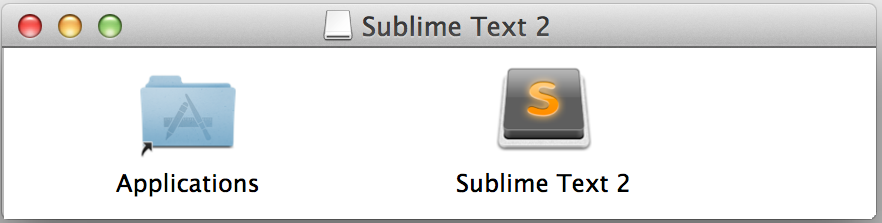
Step 9.3: Drag Sublime Text 2 into your Applications folder.
Step 9.4: Unmount the installer disk image
Verify successful installation
Type this in the terminal:git --versionApproximate expected result:git version 1.x.xThe greyed-out text may differ and is not important.Type this in the terminal:which rubyApproximate expected result:/Users/alex/.rvm/rubies/ruby-2.0.0-p247/bin/rubyThe greyed-out text may differ and is not important.Type this in the terminal:which railsApproximate expected result:/Users/alex/.rvm/gems/ruby-2.0.0-p247/bin/railsThe greyed-out text may differ and is not important.
Next Step:
Go on to Configure Git