Other Pages

Creating A Migration

Goals

    Topics
    id
    title
    description

    The suggestotron has a list of topics that people can vote on. We'll store our topics in the database. In this step you'll do the following:

  • Create a database table for topics with a title and a description
  • In this step we'll learn a bit about MVC (Model-View-Controller) architecture. By the end of this step you should understand the following concepts:

    • A record
    • Model
    • View
    • Controller

Steps

Step 1

Type this in the terminal:
rails generate scaffold topic title:string description:text
  • generate scaffold tells rails to create everything necessary to get up and running with topics.
  • topic tells rails the name of the new model.
  • title:string says that topics have a title, which is a string.
  • description:text says that topics have a description which is a "text". (We're befuddled by the difference too.)

If you want, take some time to poke around the files listed in this step.

Step 2

Type this in the terminal:
rake db:migrate

This tells rails to update the database to include a table for our new model.

Explanation

Rake

rake (Ruby Make) is a tool that allows you to run small Ruby programs (tasks) that you use often in your application. Here, rake db:migrate is a task provided by the Rails framework.

You can run rake -T to see a list of all the rake commands your app currently responds to, along with a short description of each task.

Explaining MVC and Records

MVC

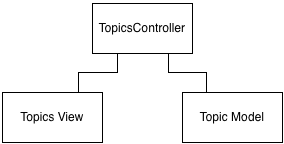
Rails implements a very specific notion of the Model/View/Controller pattern, which guides how you structure your web applications.

Model

  • saves data to the database
  • accesses data from the database
  • bridge between the database and objects

View

  • display the data for human (or machine) consumption
  • webpages are views

Controller

  • acts as the glue between the models and the views
  • combines data from multiple models
  • summarizes and filters data

In MVC, models, views, and controllers have very specific jobs. Separating responsibilities like this make it easy to maintain and extend rails applications. When responsibilities become muddied it gets much harder to debug issues and add new functionality.

Next Step:

Back to Running Your Application Locally